
What is TurboQuant?
TurboQuant is a two-stage compression algorithm for the Key-Value (KV) cache that transformer language models maintain during inference. Introduced by Zandieh et al. at ICLR 2026 with support from Google Research, it achieves near-lossless quantization of the KV cache down to about 3 bits per value, an up to 5x reduction from the standard 16 bits.
Two technical properties make TurboQuant practical at scale:
- It is data-oblivious: no calibration dataset, no model-specific tuning
- It requires no retraining: any standard transformer loading from a GGUF file benefits immediately
These properties matter because they make TurboQuant a drop-in optimization rather than a research artifact requiring expert configuration.
Why the KV cache is the memory bottleneck
When a transformer generates text autoregressively, it does not reprocess the full context for every new token. Instead, it stores the key and value projections from each attention head, in each layer, for every previously processed token. This stored data is the KV cache.
The cost grows linearly with both context length and model depth.
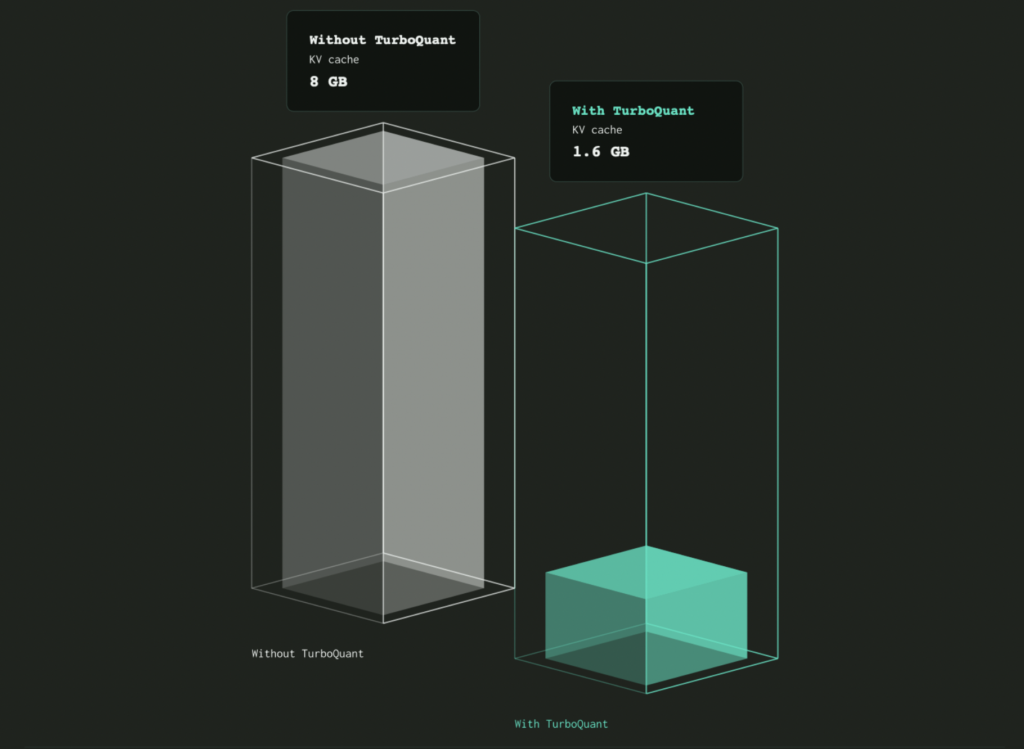
For Qwen3.5-4B running at 262K tokens of context, the KV cache in FP16 is:
2 × 8 KV-cache layers × 262144 tokens × 4 kv_heads × 256 head_dim × 2 bytes = 8GB
On an RTX 5070 with 12 GB of VRAM, the Q8 weights take roughly 4.2 GiB. At Qwen3.5-4B’s full 262K context, the FP16 KV cache then takes another 8 GiB, plus roughly 0.8 GiB for compute buffers and some extra driver/runtime overhead. In practice this setup needs closer to 14 GiB, with 16 GiB being the safer minimum, so 12 GB leaves almost nothing for activations, scratch buffers, or other concurrent allocations.
On consumer hardware in general, the KV cache is the dominant memory cost as context grows. The model can theoretically handle 262K but the hardware cannot, because the KV cache will not fit alongside the weights. TurboQuant 0.12.0 attacks this wall on consumer-grade GPUs first. Mobile and Apple Silicon coverage is on the roadmap for a future release.
How TurboQuant works: PolarQuant + QJL
Stage 1: PolarQuant (the bulk of the compression)
Standard KV quantization in Cartesian (x, y, z, …) coordinate space is lossy because the value distribution is irregular: different layers and different sequence positions have very different value ranges. Normalizing across these to enable uniform quantization is expensive and introduces error.
TurboQuant’s first insight is that KV vectors behave more predictably in polar coordinates. When you convert a high-dimensional vector to a radius plus angular components, the angular distribution becomes much more structured. The angles cluster in patterns that quantize cleanly to 3-4 bits per component without requiring the expensive normalization step.
The radius (a scalar magnitude) is stored separately at low overhead.
Stage 2: QJL (Quantized Johnson-Lindenstrauss correction)
PolarQuant alone introduces small residual errors. Stage 2 corrects them using the Quantized Johnson-Lindenstrauss Transform, which uses just 1 additional bit per component.
The Johnson-Lindenstrauss Lemma guarantees that random projections preserve pairwise distances between points in high-dimensional space within bounded distortion. QJL applies this principle to the residual after PolarQuant, recovering most of the precision that the 3-bit quantization gave up.
Total representation: ~4 bits per KV component, with near-zero residual error and no per-model calibration required.
For the full mathematical formulation and derivation, see Zandieh et al. (ICLR 2026) at the Google Research blog.
Validated benchmarks
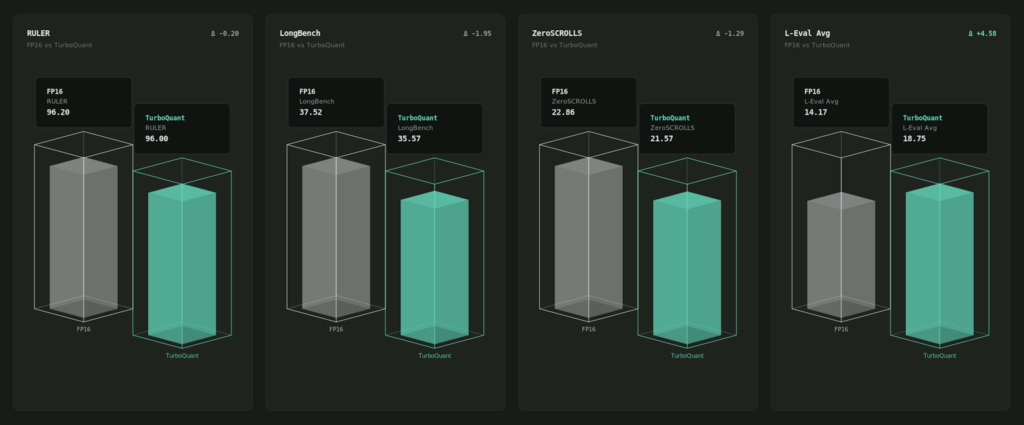
Below are the benchmarks measured by the QVAC team on Qwen3.5-4B Q8 model.
| Cache config | BPW | RULER main % | LongBench Avg | ZS Avg | L-Eval Avg |
|---|---|---|---|---|---|
| f16/f16 (baseline) | 16.00 | 96.2 | 37.52 | 22.86 | 14.17 |
| q4_0/q4_0 | 4.50 | 97.5 | 37.22 | 20.67 | 18.75 |
| tbq3_0/pq3_0 | 3.75 | 93.7 | 34.97 | 19.88 | 16.25 |
| tbq4_0/pq4_0 | 4.75 | 94.8 | 37.04 | 18.45 | 16.25 |
| tbq4_0/q4_0 | 4.88 | 96.0 | 37.57 | 21.57 | 18.75 |
More details can be found on the test protocol here.
TurboQuant in QVAC SDK 0.12.0
The QVAC integration lives inside qvac-fabric-llm.cpp, the C++ inference engine that powers the SDK. The backend choice was Vulkan, which gives cross-platform coverage from one implementation.
The Vulkan backend in 0.12.0 covers NVIDIA, AMD, and Intel GPUs on Linux and Windows. This is the workstation surface where TurboQuant ships first, validated on RTX 5090 and AMD Ryzen AI Max+ 395 (Strix Halo). Mobile GPUs (Adreno, Mali) and Apple Silicon (Metal) are on the roadmap for a future SDK release.
The integration is an internal layer of the engine. Application developers using @qvac/sdk opt in by passing a TurboQuant flag.
What this changes for local AI applications
Concrete workflows that move from “not feasible on-device” to “shipped feature”:
- Coding assistant on RTX 5090: full codebase in context for refactor / review / audit
- Long-context research on AMD Strix Halo: 100+ page document analysis without truncation
- Local 70B+ model for AI researchers: longer effective context than was previously possible on a single GPU
- Enterprise on-prem inference: regulated workloads without cloud dependency
How to use it in your code
Simply add the TurboQuant flag to your model load call. No new API surface, no model change:
await loadModel({
  modelSrc,
  modelType: "llm",
  modelConfig: {
    "cache-type-k": "tbq4_0",
    "cache-type-v": "pq4_0",
  },
});
Frequently Asked Questions
What is TurboQuant?
A KV-cache quantization algorithm published by Google Research (Zandieh et al., ICLR 2026). It compresses LLM running context memory by up to 5x with no measurable accuracy loss across major long-context benchmarks.
What is the KV cache and why does it matter?
The Key-Value cache is the working memory a transformer LLM keeps during inference. It stores the key and value projections for every previously processed token. The cache grows linearly with context length and is the dominant memory cost of long-context inference on consumer hardware.
How is TurboQuant different from earlier KV quantization methods?
TurboQuant achieves higher compression (down to ~3 bits per value) without calibration data and without model-specific tuning. Prior methods like KIVI required either more bits or a calibration step. See the ICLR 2026 paper for direct comparisons.
Will TurboQuant change my model’s outputs?
Outputs change minimally. Google Research validated zero measurable accuracy loss across four long-context benchmarks (LongBench, ZeroSCROLLS, RULER, L-Eval, NIAH) using Gemma and Mistral models. Token-level outputs may differ slightly between runs but task-level accuracy stays within benchmark tolerances.
Do I need a special model to use TurboQuant?
No. Any standard transformer loaded as GGUF works. TurboQuant is data-oblivious and model-agnostic.
Is TurboQuant in the QVAC SDK automatic or do I have to opt in?
Opt-in. Pass the TurboQuant flag when you load the model.
Resources
- QVAC SDK: https://github.com/tetherto/qvac
- QVAC Fabric LLM (Vulkan implementation): github.com/tetherto/qvac-fabric-llm.cpp
- TurboQuant paper (Zandieh et al., ICLR 2026): Google Research blog
- QVAC SDK Release notes: https://docs.qvac.tether.io/reference/release-notes/
npm install @qvac/sdk@latest