


We built an app that predicts football matches. The twist: the AI runs entirely on your own machine, it simulates each match 10,000 times, and it reasons out loud before committing to a scoreline. No cloud model, no API key, no per-token bill. You can watch it think.
This is a write-up of how it works and how to run it yourself. See it in action in our demo on X.
What it does
Open it in your browser and you get:
- A match picker: choose any upcoming fixture, or type any two national teams.
- A Predict button that runs a local model through a transparent loop: pull the team data, simulate the match, then decide.
- A reasoning panel that streams the model’s chain of thought token by token, so you see how it got there.
- A simulation panel: a win / draw / loss probability bar and a scoreline heatmap built from 10,000 simulated matches.
- A final prediction card: predicted winner, most likely scoreline, probabilities, confidence, and the key factors the model weighed.
- A second tab to browse every team’s stats and instantly simulate any matchup, no AI needed.
How it works
Three steps:
- Pull the real data. The app fetches team profiles and head-to-head history from a public football dataset, through clearly labeled network calls.
- Simulate the match 10,000 times. A Monte Carlo simulation plays the fixture ten thousand times from those team ratings. That produces an honest distribution: how often each side wins, the draw rate, and which scorelines actually show up most.
- Let the local AI read the distribution and decide. The model is handed the 10,000-run result plus the team stats and history. It weighs them, reasons out loud, and commits to a single scoreline with a confidence level and the factors it cared about.
The model is the analyst, not the dice. The simulation gives it a probability picture; the local AI turns that picture into a call you can actually read the reasoning for.
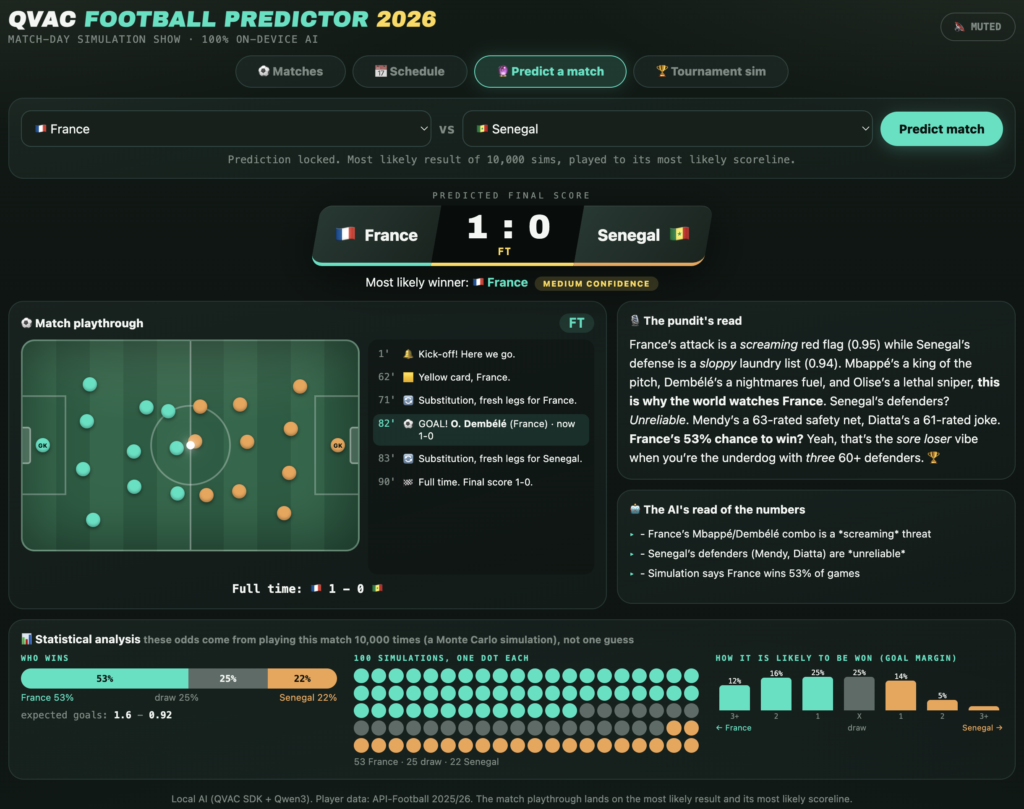
Using a local model to analyze 10,000 simulations
This is the part worth stealing for your own projects.
A Monte Carlo simulation is cheap math. Ten thousand simulated matches run in milliseconds and give you raw numbers: percentages, a heatmap, a spread of scorelines. Useful, but not a decision. Someone still has to look at “52% win, most likely 2-1, but a 19% chance of a draw and a soft defense” and turn it into a pick with a reason.
That interpretation step is where a language model earns its place, and it is exactly the kind of job a small model running locally is good at. The pattern:
- The heavy, deterministic work (the 10,000 simulations) runs as plain code, instantly, on your machine.
- The model only does what models are for: read the distribution, weigh it against context, explain the trade-off, and commit.
- Because the model runs on-device, its full chain of thought streams straight to your screen. You are not getting a one-line answer from a black box in someone’s datacenter. You see the reasoning as it forms.
And it costs nothing per run. A cloud model charges per token, so streaming a long chain of thought for every prediction adds up fast. A local model streams as much reasoning as you want for free. Your prompts, the reasoning, and the decision never leave the device.
Why local
- Your machine, your model. Inference is 100% on-device. No cloud LLM, no API key for the AI.
- Free to run. No per-token cost, no matter how much the model thinks out loud.
- Transparent by default. The reasoning and the LOCAL / NETWORK split are right there on screen, so the privacy boundary is honest, not a footnote.
It is not an oracle, and that is the point
A small local model is not a betting oracle, and the app does not pretend otherwise. The honesty is the design. It shows the data it pulled, the full simulation spread, and its reasoning, so you can judge the call instead of trusting it blindly. We have published predictions that turned out wrong, and that is fine. The interesting thing here is not whether a 4B model can beat the bookies. It is that a capable AI can run, reason, and explain itself entirely on hardware you own. This is not betting advice.
Make it yours
The repo is a starting point, not a finished product. A few directions:
- Swap in a different local model and compare how the reasoning changes.
- Create your own simulation engine, with your own weights.
- Add club leagues, not just national teams.
- Turn the simulation count up or down and watch the confidence move.
- Wire the final card into a thread bot that posts the pick with the reasoning attached.
Want your AI coding agent to make the change for you? Point it at the repo and hand it this prompt:
You are updating the QVAC Football Predictor, a local-AI football match predictor built on the QVAC SDK.
Read the repo at: https://github.com/tetherto/qvac-football-predictor.
Your source of truth for anything SDK-related: https://docs.qvac.tether.io/llms-full.txt.
Grep it before writing any QVAC code, and never invent APIs.
Then make this change: [describe what you want, for example "add club leagues", "swap in a larger local model", or "raise the simulation count to 50,000"]. Keep all model inference 100% on-device, keep any API keys server-side so the model never sees them, and run the app to confirm it works before you finish.
Get it
Clone the build and run it:
git clone https://github.com/tetherto/qvac-football-predictorOr start your own local-AI project from scratch with the SDK:
npm install @qvac/sdkEverything runs on your machine. QVAC is open source (Apache 2.0) and free.
Docs: docs.qvac.tether.io. If you build something with it, star the repo and tag us on X.
A note on what this is
QVAC Football Predictor is not a new QVAC product. It is an illustrative project, built to showcase what a local AI agent can do with the QVAC SDK: real data, on-device inference, and no cloud, all in one small app.
Data sources
The match data comes from public football sources, fetched server-side through clearly labeled network calls:
- openfootball/worldcup.json (keyless, public domain): the default source for fixtures and historical results.
- API-Football (api-sports.io): an optional richer source for injuries, recent form, and bookmakers’ odds. It needs a free API key.
The repo does not include any API key. If you use API-Football, you bring your own key and it stays server-side. The local model never sees it.
Important Note:
This post provides an illustrative example only and provided “as is.” You are responsible for what you build, whether you use this post or not, including ensuring what you build complies with applicable laws and is appropriately safeguarded. Use of this content is subject to the Tether.io Website Terms.