The QVAC SDK: a single JavaScript interface for LLM completion and other capabilities. See how it works under the hood.
H
Hugo Desousa
You want to add speech-to-text to your app. So you find a Whisper binding, wrestle with cmake for an hour (okay, a day) and get it working on your Mac. Nice. Then the PM says "we need translation too." Different library. Different build system. Different API. Then someone asks about mobile. Deep breath. You start over.
Cue the QVAC SDK: a single JavaScript interface for LLM completion, image generation, on-device fine-tuning and other capabilities (for now transcription, translation, text-to-speech, OCR and embeddings). Same API on Node.js, phones and desktop. No cloud required.
So what exactly is the QVAC SDK?
The QVAC SDK (@qvac/sdk) is the one package to rule them all: your single import for every AI capability in the QVAC ecosystem. It wires together native C++ inference engines (llama.cpp, whisper.cpp, Bergamot, stable-diffusion.cpp and ONNX Runtime), a plugin system that lets you pick only the ones you need and a P2P layer built on Hyperswarm for sharing models between devices without a server.
It runs on three runtimes:
Node.js for servers and CLI tools
Bare - a lightweight JS runtime with native addon support
Expo / React Native for iOS and Android
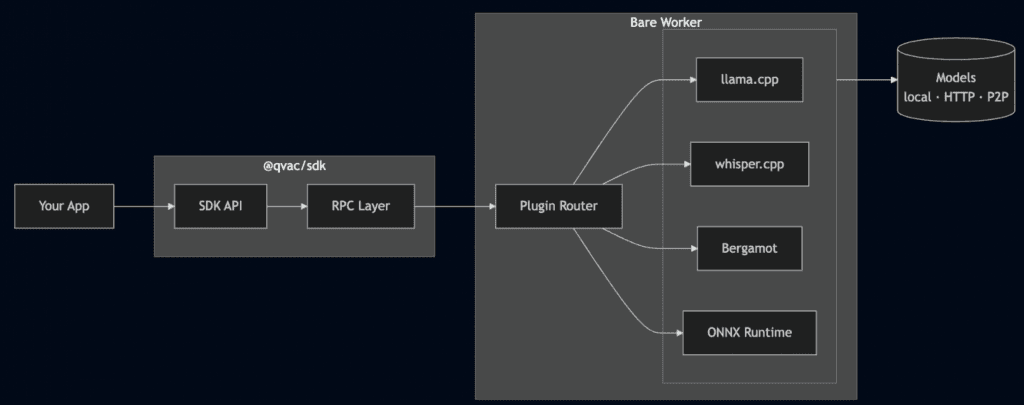
The SDK hides all of that behind one API. Call loadModel, call completion or transcribe or translate, and the right engine does the work. You don't think about which runtime you're on because honestly... you shouldn't have to. The RPC layer sorts it out through conditional imports.
QVAC SDK diagram
The worker starts once and gets reused: one RPC client and one Bare process per app, not per model. Load as many models as your RAM can stomach and run inference on all of them. When you're done, unloadModel() frees memory; close() shuts down the worker entirely. When running directly on the Bare runtime there's no separate worker at all: everything runs in-process.
Getting started
Install the SDK:
npm install @qvac/sdk
Here's a working LLM completion:
import { loadModel, LLAMA_3_2_1B_INST_Q4_0, completion, unloadModel,} from "@qvac/sdk";const modelId = await loadModel({ modelSrc: LLAMA_3_2_1B_INST_Q4_0, modelType: "llm", onProgress: (progress) => console.log(progress),});const result = completion({ modelId, history: [ { role: "user", content: "Explain quantum computing in one sentence" }, ], stream: true,});for await (const token of result.tokenStream) { process.stdout.write(token);}// => "Quantum computing uses quantum bits that can exist in multiple states// simultaneously, enabling parallel processing of complex problems."await unloadModel({ modelId });
That LLAMA_3_2_1B_INST_Q4_0 constant comes from a built-in model registry that leverages the Holepunch stack for fully peer-to-peer distribution. Within the registry, every model has a name, source URL, expected size, and SHA-256 checksum baked in. No more bookmarking web pages and praying the link still works next month. You can also browse the registry at runtime:
Now swap the model type and you get a completely different capability. Transcription:
import { loadModel, transcribe, WHISPER_TINY } from "@qvac/sdk";const modelId = await loadModel({ modelSrc: WHISPER_TINY, modelType: "whisper",});const text = await transcribe({ modelId, audioChunk: "./meeting.wav" });console.log(text);// => "Let's circle back on the Q3 roadmap after lunch."
Same pattern. loadModel, do the thing, unloadModel. Whether you're running an LLM, transcribing audio, translating text, generating images, or extracting text from images, it's the same three steps.
The Landscape
If you're a JS developer looking at local AI today, there's no shortage of options. Great LLM runtimes for Node.js. Mobile-first libraries for on-device models. Each one does its thing well. The ecosystem is thriving, which is awesome, until you need more than one thing.
Because real apps don't fit neatly into one box. You need transcription on the phone, embeddings on the server, and translation in a desktop app. That's three libraries, three build systems, three sets of docs, and the quiet hope that they all handle model caching the same way. (They don't.)
That's the gap we saw. Most local AI tools pick a runtime or a modality and go deep. We wanted something that goes wide: across Node.js, mobile and desktop with a single API, where "AI" means more than just chat completion. LLMs are just one of eight capabilities the SDK ships today.
Going deeper: composability
Here's the thing that took us the longest to get right, and the part we're proudest of: you don't care about what you don't use.
Each AI capability in QVAC has its own best-in-class C++ engine. llama.cpp for text generation. whisper.cpp for transcription. Bergamot for translation. stable-diffusion.cpp for image generation. ONNX Runtime for TTS and OCR. That's a lot of C++ to carry around if you just want to transcribe some audio.
Early on, we tied the SDK to a single engine. It worked great... until we needed transcription. Then translation. Then OCR. Each engine has completely different inputs and outputs, and trying to shove them all into one runtime meant compromises everywhere. So we asked: what if we don't pick one engine at all?
That's how the plugin system was born. Each capability is a separate plugin:
That qvac.config.ts tells the CLI: "I only need LLM and translation". The engine packages (@qvac/llm-llamacpp, @qvac/transcription-whispercpp, @qvac/tts-onnx, etc.) are all direct dependencies of the SDK: they're there when you install it. But when you run qvac bundle sdk, the CLI reads your config, generates a worker entry with only those two plugins, and produces a tree-shaken bundle alongside an addons.manifest.json listing exactly which native binaries your app needs. No whisper.cpp. No ONNX TTS. No stable-diffusion.cpp. You ship only what you use.
The tricky part was keeping the API clean. LLMs want a prompt and context window. Transcription wants raw audio and a language code. Diffusion wants a text prompt, image dimensions, and sampling parameters. ONNX wants a session and input tensors. Instead of one giant API full of if (engine === 'whisper') branches, each capability became its own plugin behind a consistent interface. From your side, it's always loadModel → do the thing → unloadModel. The SDK figures out which engine to call. Adding a new capability won't change the API surface at all. It's just another plugin.
Then there was the model problem. Developers spend a surprising amount of time just finding models. Which quantisation? Where's the download link? Did someone move the repo again? We built a registry right into the SDK: every supported model is a typed constant with its source, size, and SHA-256 checksum. LLAMA_3_2_1B_INST_Q4_0 isn't a string you copy from a README. It's a real object the SDK knows how to download, verify, and cache. One less browser tab open.
But here's the fun part: the API doesn't care which plugins you picked. It stays the same. Here's RAG, composing the embedding plugin with a vector database:
The latest addition to the engine lineup is stable-diffusion.cpp, giving the SDK text-to-image generation. The API follows the same pattern: load a diffusion model, call diffusion(), get PNG buffers back.
import { loadModel, diffusion, unloadModel, SD_V2_1_1B_Q8_0,} from "@qvac/sdk";import fs from "fs";const modelId = await loadModel({ modelSrc: SD_V2_1_1B_Q8_0, modelType: "diffusion",});const { progressStream, outputs } = diffusion({ modelId, prompt: "a photo of a cat sitting on a windowsill", width: 512, height: 512, steps: 20,});for await (const { step, totalSteps } of progressStream) { console.log(`${step}/${totalSteps}`);}const buffers = await outputs;fs.writeFileSync("cat.png", buffers[0]);await unloadModel({ modelId });
The registry ships with Stable Diffusion v2.1, SDXL, and FLUX.2 models in various quantizations. FLUX models need companion encoder and VAE files — the SDK handles downloading and wiring those up when you specify them in modelConfig:
You get full control over sampling methods, schedulers, CFG scale, seeds, and batch counts. But the defaults work fine if you just want to throw a prompt at it and get an image back. Same loadModel → do the thing → unloadModel. No new concepts.
Fine-tuning
Running inference on pre-trained models is great. Making those models actually yours is better. The SDK now supports LoRA fine-tuning for LLMs directly through the same interface — no Python, no notebooks, no separate training pipeline.
Load a model, point it at your dataset, and call finetune():
The training runs entirely on-device through llama.cpp's LoRA implementation. You get streaming progress with loss, accuracy, step count, and ETA. You can pause a run, resume it later, or cancel it outright:
Train on your data. Keep your data. Run the result locally. The whole loop — fine-tune, evaluate, deploy — happens on your machine without ever touching a cloud service.
Eight capabilities. Eight engines. One API pattern. Not bad for a single npm install.
P2P: Not just downloads
The SDK sits on top of Hyperswarm: the peer-to-peer networking stack from the Holepunch ecosystem. The built-in model registry is backed by Hypercore, so model discovery and downloads happen over P2P. No accounts, no API keys, no central server that can go down.
But P2P isn't just about getting models onto your device. One of our favorite features is delegated inference: you can connect devices directly over the network and offload inference from one to another. Say you're building a mobile app, but you've got a beefy desktop sitting on the same network. Instead of running inference on the phone, you delegate it to the desktop:
No DNS. No server. Just two devices finding each other over Hyperswarm and one of them doing the heavy lifting. If the desktop goes offline, fallbackToLocal: true means the phone picks up the work itself. The API looks identical either way: your app code doesn't know or care where inference actually runs.
Results
Enough storytelling, here's the full menu at v0.9.0:
Capability
Engine
Model Example
LLM Completion
llama.cpp
Llama 3.2 1B/3B, Qwen3 4B
Transcription
whisper.cpp
Whisper Tiny through Large
Transcription
Parakeet (ONNX)
CTC and Sortformer
Embeddings
llama.cpp
GTE Large
Translation
Bergamot (Marian)
30+ language pairs
Text-to-Speech
ONNX
Chatterbox, Supertonic
OCR
ONNX (FastText)
Document text extraction
Image Generation
stable-diffusion.cpp
SD v2.1, SDXL, FLUX.2
Fine-tuning (LoRA) works on any loaded LLM model - it's not a separate plugin but a first-class operation on the LLM engine.
All of these run on Node.js, Bare, and Hermes (Expo). Models download with progress callbacks, cache locally, and verify against checksums. The model registry grew from 312 to 653 constants in this release alone — including Bergamot translation pairs and 9 diffusion models across SD, SDXL, and FLUX. The completion API returns async generators for streaming, plus promises for text, stats, and toolCalls — use whichever pattern fits your app.
Will your phone match a desktop GPU? No. Will quantized models hallucinate a little more than full-precision ones? Probably. We're not going to pretend otherwise: these are trade-offs we've made deliberately, and we think they're the right ones when considering the importance of owning your data and your intelligence.
What's next
Delegated inference improvements. Better connection resilience, smarter load balancing, and support for multiple clients connecting to the same provider — so a single beefy machine can serve inference to a whole team or household.
New language SDKs. JavaScript got us here, but we know where a lot of AI work happens. A Python client is first in line, with more languages to follow — giving the same local-first, P2P experience beyond the JS ecosystem.
We built QVAC because we wanted local AI to feel as easy as calling a cloud API — without the cloud. No accounts. Data never leaves your machine; there's no sending your users' data to a random server. Just your code, your models, your devices. Everything local, everything private. To us personal sovereignty isn't just a feature: it's the whole point.
If you want to try it just do npm install @qvac/sdk, load a model, run a completion. The whole thing takes about 1 minute. If something breaks, open an issue. If something works surprisingly well, tell us about that through our community on Discord. Also, feel free to share what you're building with others — we'd love to hear about it.
We built Genesis III to push small models as far as they can go on STEM. A 1.7B model trained on it answers more than twice as many questions correctly as the same model trained on the open alternative, from an identical token budget.
TranslatePsy-AfriSLM is our translation model for 19 African languages, small enough to run on a phone. We built a demo on it: paste text or photograph a page, and read it in your language, with no connection and nothing to pay.
Our engineering team has been optimising the QVAC audio stack, so we measured it. We put qvac-fabric-speech.cpp against the open-source engines people run for transcription, speech synthesis and music generation, on four machines and six GPU lanes, timing every engine from outside its own process so that nobody's own stopwatch is quoted. QVAC leads on the GPU lanes we measured, across every vendor. Here is each number, and how we took it.
We built Genesis III to push small models as far as they can go on STEM. A 1.7B model trained on it answers more than twice as many questions correctly as the same model trained on the open alternative, from an identical token budget.
TranslatePsy-AfriSLM is our translation model for 19 African languages, small enough to run on a phone. We built a demo on it: paste text or photograph a page, and read it in your language, with no connection and nothing to pay.
Our engineering team has been optimising the QVAC audio stack, so we measured it. We put qvac-fabric-speech.cpp against the open-source engines people run for transcription, speech synthesis and music generation, on four machines and six GPU lanes, timing every engine from outside its own process so that nobody's own stopwatch is quoted. QVAC leads on the GPU lanes we measured, across every vendor. Here is each number, and how we took it.